The question
An electric car today is basically a computer on wheels, and the centre screen is where the driver touches it most. That interface has to be smooth, instant and feel like it has depth. Usually that means a game engine or a dedicated HMI toolkit.
We wanted to try something else: can Rive, a tool known for 2D animation, carry a complete HMI, including the 3D car in the middle of the screen? VF7 HMI Concept is our answer. It is a personal, non-commercial project that uses the VF7 as a reference so we had a real context to design for.
A tour of the five screens
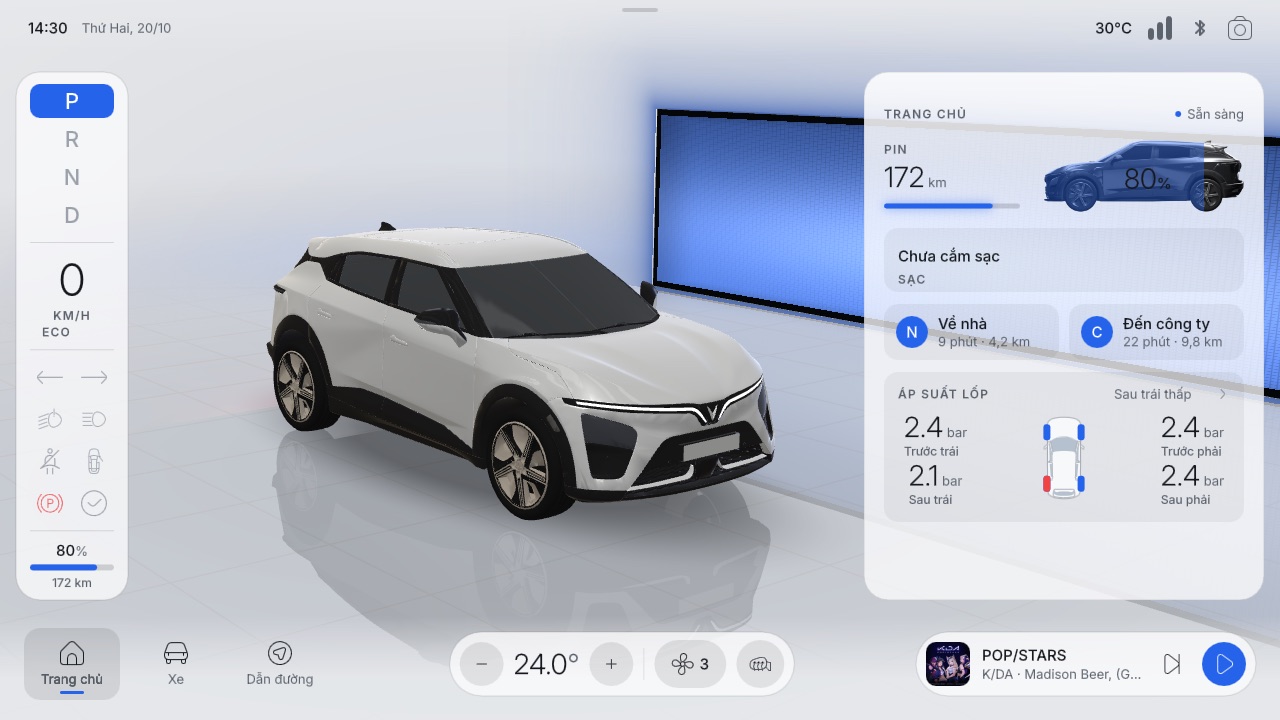
The layout works like a stage: the car stands in a glowing studio with glass panels floating above. The cluster on the left (P R N D, speed, drive mode, tell-tales) and the bottom bar always stay in place. When you change screens, the camera flies to a new angle that suits it.
The small things
A start-up scene
When the file opens, the car rolls into the studio, brakes with a slight nose dip, and only then does the interface fade in. It takes a few seconds, but it sets the tone: this is a car with weight, not a picture.
The lights are real
Daytime running lights, low and high beams with light spill on the floor, tail lights and indicators are all computed in the shader. The wheels turn with the distance travelled. Four paint colours switch instantly.
Quick controls, light and dark
Swipe down from the top edge for quick controls: paint, theme, lock, lights, brightness, volume. Every accent colour comes from one place, so switching light/dark or changing the brand colour is a single value. Drag the slider below to compare both modes.
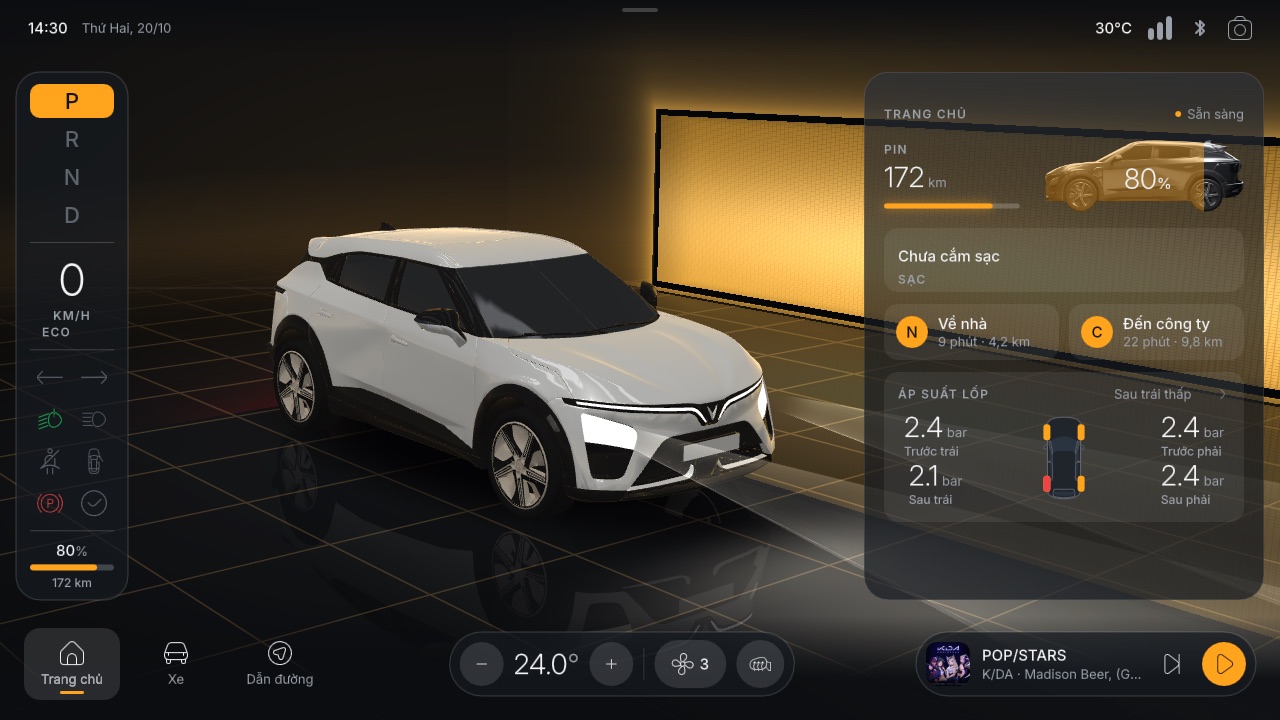
 Dark
Light
Behind it: no drag and drop
The biggest difference is how it was built. Instead of placing layers by hand in the Rive Editor,
the whole scene (artboards, layout, data binding, state machines, listeners) is generated by code. A Python script writes an RML (Rive Markup Language)
file, and the Rive CLI builds it into a .riv.
gen.py holds every colour, size and font token and writes scene.rml..riv that runs on the web.A 3D car in Luau and WGSL
Rive now lets you write scripts in Luau and talk to the GPU. We used that to write a
.glb loader that runs inside Rive, then draw a roughly 210k-triangle model with our own
WGSL shader. The same shader handles the car materials, studio reflections, shadows, doors swinging
on their hinges, spinning wheels, light beams, climate airflow and even the road in the driving
scene.
Everything else is a set of small scripts, each with one job: the music player, the driving simulation, the cluster, charging, the quick-controls gesture and the light/dark colour converter.
Why generate the scene with code?
- Consistency. Every colour, spacing and type size lives in one token block. Change it once, the whole UI follows.
- Fast iteration. Edit the generator, run it, and the previewer rebuilds. No hand-tweaking hundreds of layers.
- Testable. A script loads sample data and screenshots every screen, so each change can be compared.
By the numbers
Driven from outside with data binding
All interface state lives in a single view model. The UI doesn't "know" anything about the car; it simply shows what it is given. That means the car's software, or a web page like the buttons at the top of this post, can drive it with a few lines:
const vm = rive.viewModelInstance;
vm.number('section').value = 1;        // go to Vehicle
vm.number('paint').value = 2;          // red paint
vm.number('doorFL').value = 1;         // open front-left door
vm.number('batteryFrac').value = 0.63; // 63% battery
vm.number('chargeState').value = 1;    // charging
For a product team, this means designers and engineers share one "data contract". Designers can reshape the interface freely as long as the property names stay the same, and engineers never have to rebuild the UI in code.
Lessons and limits
- File size. The full build is about 24 MB, mostly music. The web version keeps two tracks and comes in around 11 MB. In a real product, music and models would stream separately instead of being packed in.
- Performance. Smooth on desktop. Low-end phones struggle with the 3D model; an in-car screen has dedicated hardware, so this isn't an issue there.
- Files with scripts must be signed before the web runtime will run them. Put signing into the build pipeline from day one.
- Rive has moved well beyond 2D. With scripting and GPU access it can handle interfaces that used to need a game engine, while keeping its strengths: small files, cross-platform runtimes, and designers editing directly.
"An in-car interface doesn't need a game engine. It needs a tool designers and engineers can both work in."
Wrapping up
VF7 HMI Concept was an experiment to see how far Rive can go. The result beat our expectations: a full 3D HMI, controllable from outside, in a single file. If you are building interfaces for cars, smart devices or any hardware screen, we would love to talk.
Note: Personal, non-commercial project. Not affiliated with VinFast. Vehicle name, logo and design are used for illustration only.
Credits: Rive web runtime (MIT) · Inter font by Rasmus Andersson (SIL OFL) · Icons: Flaticon (Uicons Thin Rounded, "Car dashboard outline"), Icons by Flaticon · Music: K/DA (Riot Games), all rights belong to their owners, used for illustration only · 3D model: clay VF7, decimated and edited in Blender.

Double D Team
Rive Interaction Design
We design and build real-time interactive experiences with Rive, from mascots and brochures to hardware interfaces like automotive HMI.

